Business Process Model Design Tool

FluxNova

FluxNova

FluxNova

Teams designing BPMN processes in FluxNova had no reliable way to find, share, or finish each other’s files — work lived as single-user documents, so similar processes were rebuilt from scratch, and months of work were lost if an author left or rules changed mid-process. I designed the next major update for the existing modeler: a shared project library with publishing, plus file explorer, versions, and comments in the designer, so teams could reuse approved work instead of starting over. The result, from the case’s own figures, was 10×+ more files completed, −90% time to start a project, 10k+ files reused, and 90% adoption across several teams.

Role

Senior Product Designer

Domain

Enterprise and FinTech

Focus

Reusable Files
1. Overview

1. Overview

Teams created files one author at a time, with no way to find, share, or reuse work once it was published

Teams created files one author at a time, with no way to find, share, or reuse work once it was published

Teams created files one author at a time, with no way to find, share, or reuse work once it was published

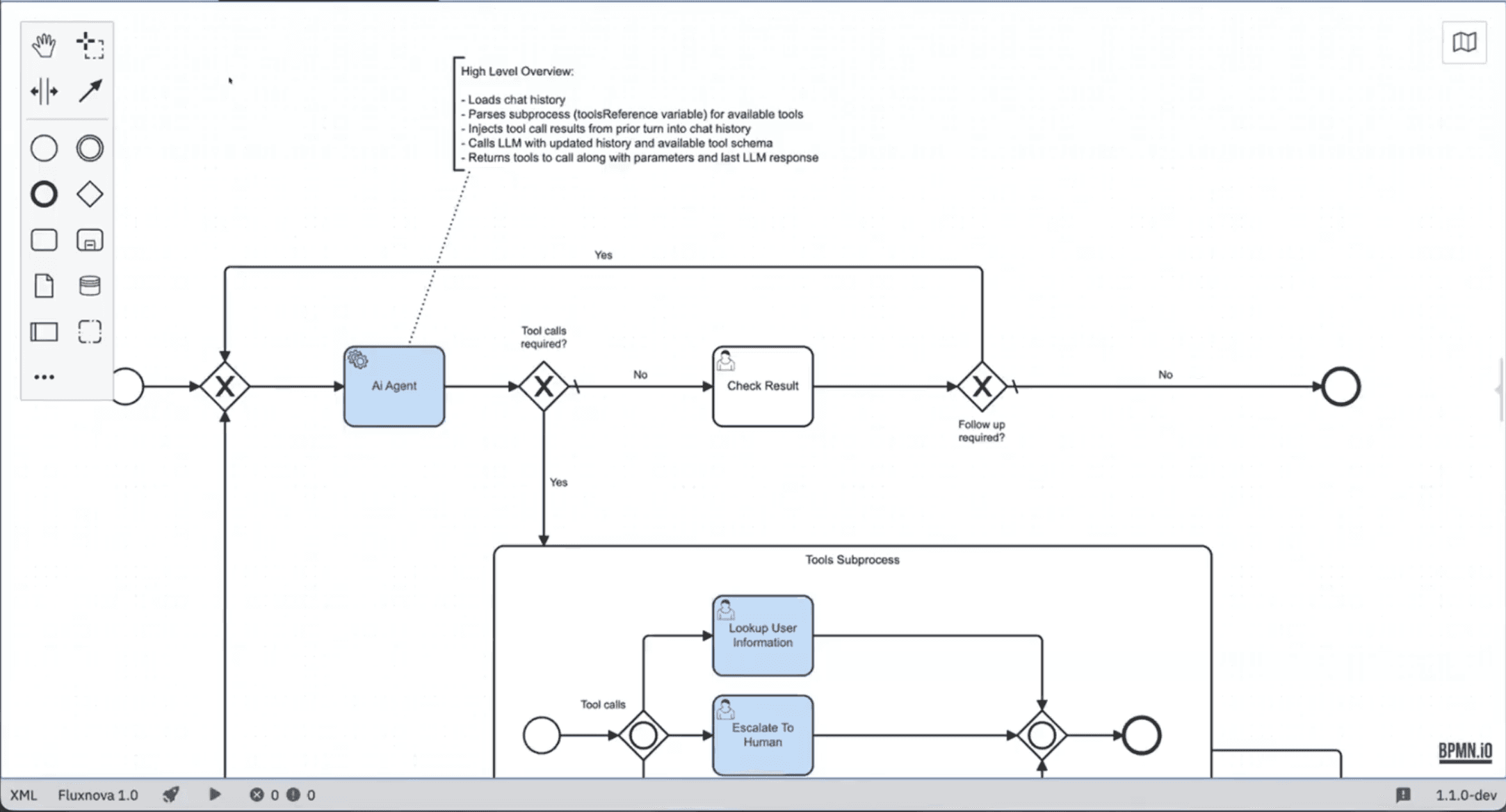
An open-source workflow orchestration platform designed primarily for enterprise and financial services organisations.


In simple terms, it allows organisations to design, automate, execute and monitor complex business processes across multiple systems, applications and teams.

An open-source workflow orchestration platform designed primarily for enterprise and financial services organisations.

In simple terms, it allows organisations to design, automate, execute and monitor complex business processes across multiple systems, applications and teams.

10×+

10×+

More files completed

−90%

−90%

Time to start a project

10k+

10k+

Files reused

90%

90%

Adoption across several teams

2. The Challenge

2. The Challenge

When work couldn’t be shared or found, teams repeated the same design tasks.

When work couldn’t be shared or found, teams repeated the same design tasks.

When work couldn’t be shared or found, teams repeated the same design tasks.

Teams in different countries and time zones were creating similar BPMN processes, and had no way to know those files already existed.

Teams in different countries and time zones were creating similar BPMN processes, and had no way to know those files already existed.

1

1

Teams had no way to know whether a file that met their needs already existed.

Teams had no way to know whether a file that met their needs already existed.

2

2

Only the original designers understood how a process had been designed.

Only the original designers understood how a process had been designed.

3

3

When laws changed in a country, files became obsolete and designers had to start over.

When laws changed in a country, files became obsolete and designers had to start over.

4

4

Because existing work was so hard to find, designers created derivative files instead of reusing what was already there.

Because existing work was so hard to find, designers created derivative files instead of reusing what was already there.

3. The Research

3. The Research

Teams used workarounds, because the modeler had no way to share or discover files.

Teams used workarounds, because the modeler had no way to share or discover files.

Teams used workarounds, because the modeler had no way to share or discover files.

Share files in Teams

People shared files they knew others might need — or had been asked for — in Microsoft Teams.

Create naming conventions

Each team invented its own naming convention to find the files that mattered.

Share the files in the middle of the design process

When someone needed a colleague to take a file further, they shared it mid-process rather than branching in the modeler.

Files become useless when the creator leaves the company

Complex files were often months of work. When the author left, the file became locked and unusable.

Files need to be restarted if they aren’t finished in time

Some files became obsolete mid-process because of external changes, and people discarded them and started again.

Users are aware of the lack of discovery

To find out whether a useful file existed, people had to ask their manager to ask another manager.
4. The Solution

4. The Solution

I added two features to the modeler teams already used

I added two features to the modeler teams already used

I added two features to the modeler teams already used

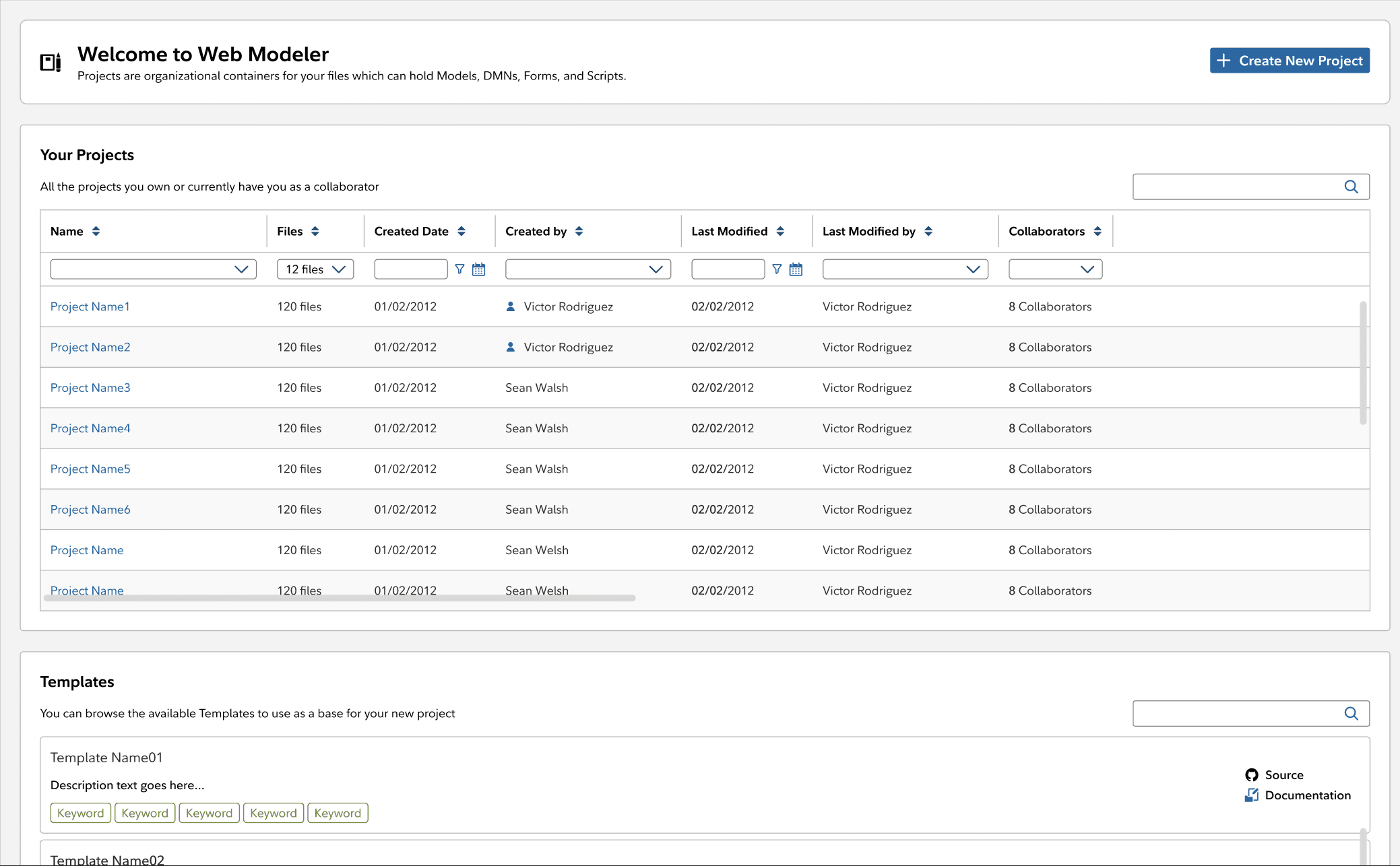
First I designed a shared project library for publishing and discovering files, so people could start from existing models, adapt them, and move faster.

First I designed a shared project library for publishing and discovering files, so people could start from existing models, adapt them, and move faster.

The library can save months when a published file already matches what’s needed. Managers review and approve publishing, so files are tagged correctly and can be found by teams in different security realms or business units.

The library can save months when a published file already matches what’s needed. Managers review and approve publishing, so files are tagged correctly and can be found by teams in different security realms or business units.

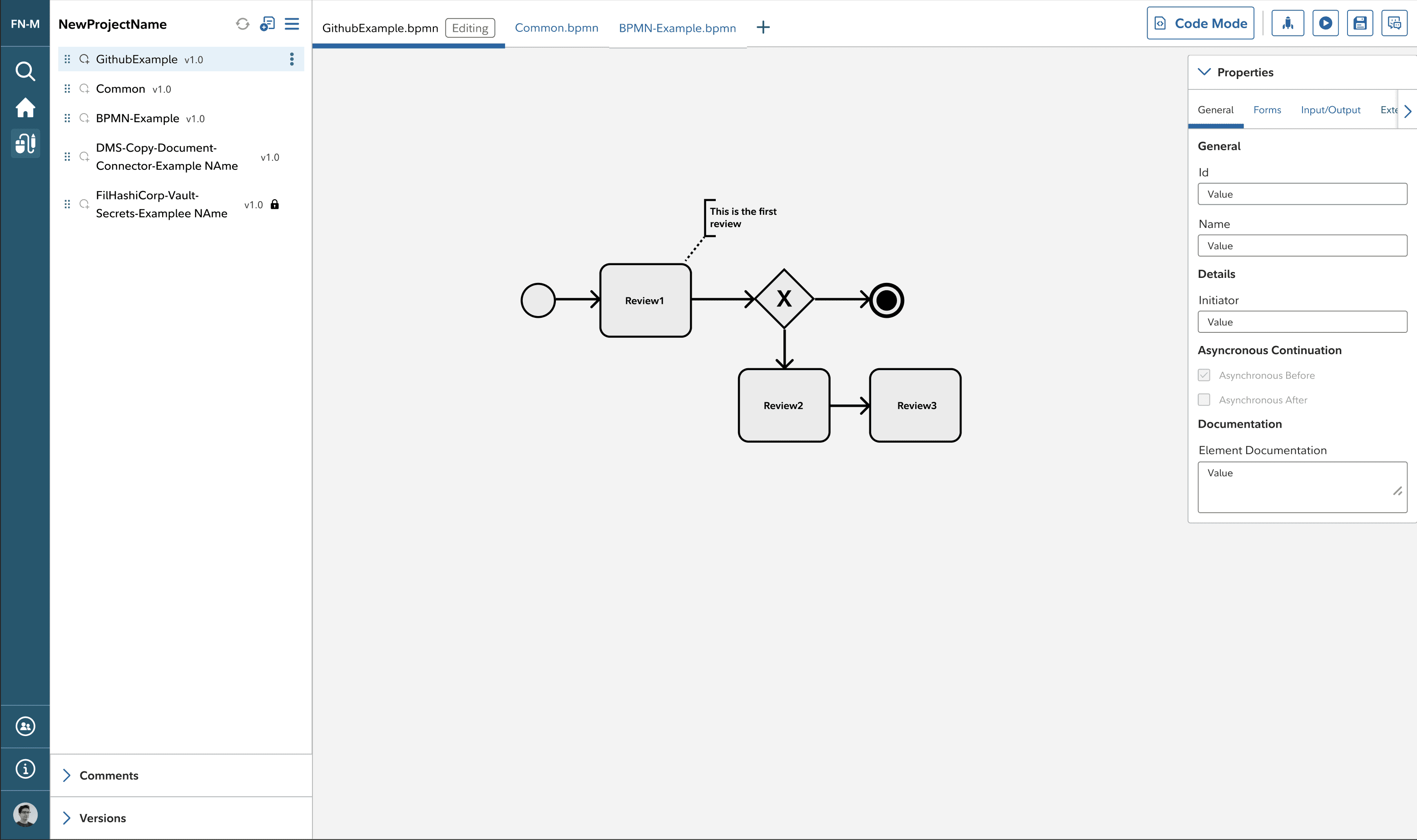
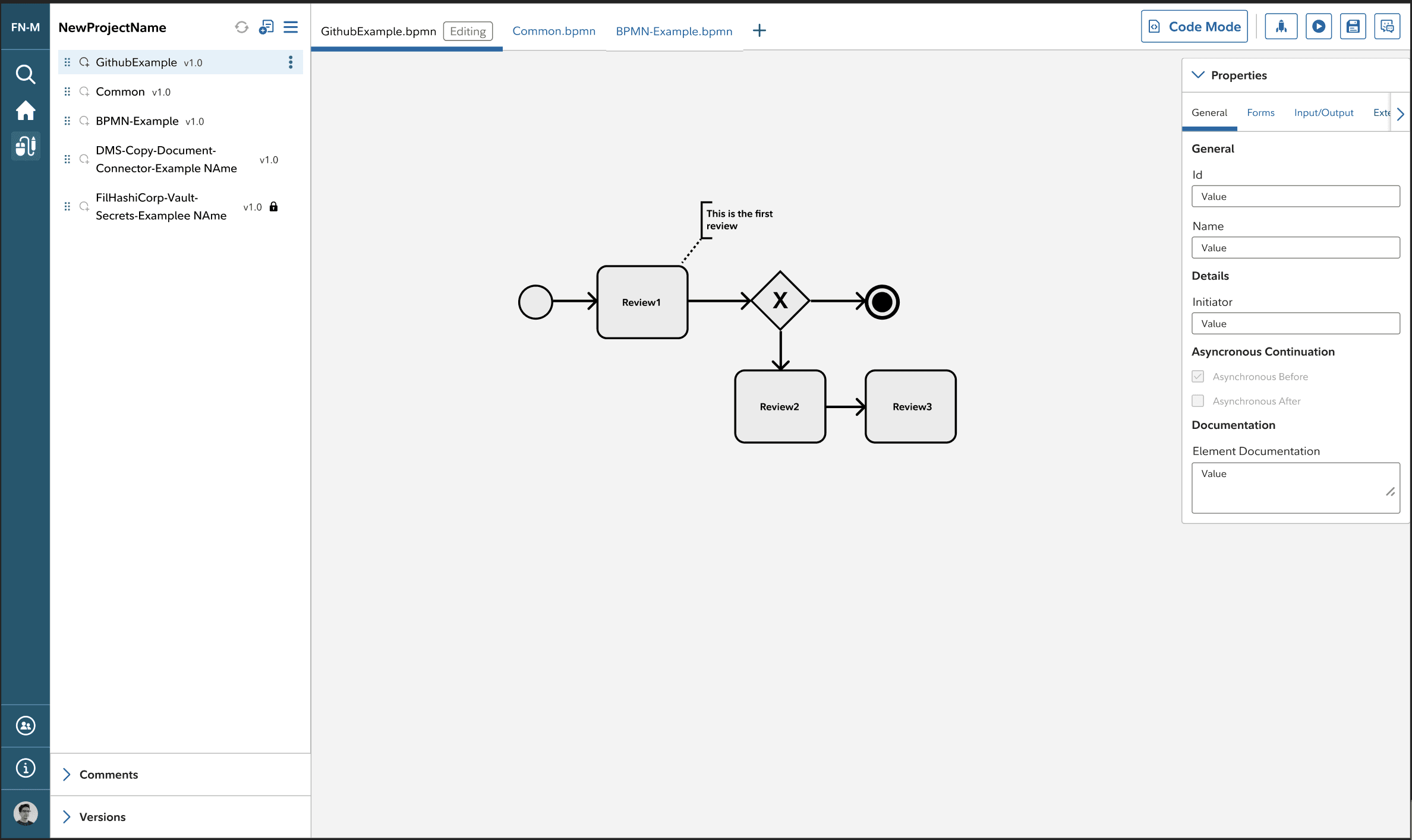
The second feature is a panel in the designer: file explorer, versions, and comments.

The second feature is a panel in the designer: file explorer, versions, and comments.

File Explorer

Versions

Comments

Project file explorer

People can create projects with more than one file and deploy them together, instead of packing everything into one large, complex model.

Common Files and Referenced files

Files can reference each other, or belong to the same process, so keeping them in one place means less time gathering what you need.

Single Deployment

Deploying the files together makes it easier to track the success of the project as a whole.

5. Impact

5. Impact

Less waste, more control, faster deliveries.

Less waste, more control, faster deliveries.

Less waste, more control, faster deliveries.

Projects, not single files

Projects, not single files

Projects, not single files

Teams now work in projects, not isolated single files.

Never lose progress

Never lose progress

Never lose progress

Access previous file versions and recover earlier work whenever needed.

Freedom to revisit

Freedom to revisit

Freedom to revisit

Build new files from older versions without starting from scratch.

Reduced duplication

Reduced duplication

Reduced duplication

Share files across teams instead of recreating work that already exists.

Improved quality

Improved quality

Improved quality

Get colleagues to review work, identify issues and verify results.

Reuse existing work

Reuse existing work

Reuse existing work

Turn approved files into reusable templates for future projects.

End of case study

End of case study

Designed to balance business needs and user needs.

Designed to balance business needs and user needs.

Designed to balance business needs and user needs.

Back to Home